D-LINK DP-301P Ethernet Parallel Port Print Server 790069262579
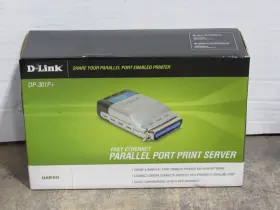
( Brand: D-link ), ( Manufacturer Part Number: DP-301P ), ( Loc: 90440 Sf 4328 1-2-25 ), ( Type: Server ), ( Country/region Of Manufacture: China ), ( UPC: 790069262579 )
Review D LINK New Model Fast Ethernet Parallel Port Print Server
The D-Link DP-301P Ethernet Parallel Port Print Server is an efficient and cost-effective solution for integrating legacy parallel port printers into a modern networked environment. This compact device features one Ethernet port for easy connection to a network and one DB-25 parallel port connector for connecting the printer. It is designed to act as a bridge between the printer and the network, enabling multiple users on a network to share the same printer.
Measuring only 10.6 x 15.4 x 2.6 centimeters (4.2 x 6.1 x 1 inches) and weighing just 235 grams (8.3 ounces), this print server is highly portable. It is also equipped with Energy Star certification, making it an energy-efficient option for businesses and home offices.
The D-Link DP-301P supports both TCP/IP and LPD (Line Printer Daemon) protocols, ensuring compatibility with various operating systems such as Microsoft Windows, macOS, Linux, and UNIX. Installation is straightforward, with no requirement for additional drivers for popular operating systems.
This print server includes features like web-based administration, allowing for easy configuration and management through any web browser. It also supports Printer Pooling and Print Broadcasting, which enable multiple users to access the same printer simultaneously and automatically discover printers on the network.
Additionally, the D-Link DP-301P offers comprehensive security features, such as Secure Sockets Layer (SSL) encryption, preventing unauthorized access to the printer from the network. It is also compatible with D-Link's Centralized Management System (CMS) for easy management of multiple print servers.
In conclusion, the D-Link DP-301P Ethernet Parallel Port Print Server is a functional and versatile solution for integrating legacy parallel port printers into a networked environment. Its compact size, easy installation, and robust print management features make it a valuable asset for businesses and home offices alike.
The D-Link DP-301P Ethernet Parallel Port Print Server is a device designed to allow connectivity between a parallel port printer and a network, enabling users to print from various devices connected to the network. Here are some pros and cons of buying this print server:
Pros:1. Multi-Platform Compatibility: The D-Link DP-301P is compatible with various operating systems such as Windows, macOS, and Linux, and supports multiple print queues.
2. Easy Setup: The print server comes with a user-friendly web-based interface that simplifies the installation process. It also comes with a CD containing drivers for various operating systems.
3. Reliable and Stable: D-Link print servers are known for their reliability and stability. The DP-301P model includes PPP (Point-to-Point Protocol) Over Ethernet (PPPoE) and DHCP (Dynamic Host Configuration Protocol) support to ensure a stable network connection.
4. Cost-Effective: The DP-301P is an affordable solution for network printing. It eliminates the need for investing in multiple printers for different networked devices.
5. Supports Large Capacity Paper Feeds: The print server supports paper sizes up to A3 and paper weights up to 220 gsm, making it suitable for larger offices dealing with heavy-duty printing assignments.
Cons:1. Limited Printer Compatibility: While the DP-301P supports most parallel port printers, it might not be compatible with some older or specialty printers.
2. Limited Printing Speeds: The print server may not be able to handle extremely high printing speeds given the nature of the technology.
3. Dependence on Network Available: The print server's functionality relies on the network connection, and a network outage could impact printing capabilities.
4. Limited Interrupt Handling: The DP-301P may not support extended printer functionality like duplex printing, automatic document feeder, or advanced job queues.
5. Limited to Parallel Port Printers: The print server is designed specifically for parallel port printers, while modern printers often use USB or Wi-Fi connections.
In conclusion, the D-Link DP-301P Ethernet Parallel Port Print Server offers an affordable, reliable, and convenient solution for network printing in small to medium-sized offices. Its ease of use, compatibility with multiple operating systems, and cost-effectiveness are significant advantages. However, its limited printer compatibility, printing speeds, and dependence on a network connection are drawbacks to consider. If you extensively use printers that are not parallel port or require advanced features, a more advanced print server might be a better investment. But for most offices with standard parallel port printers and a need to enable network printing, the DP-301P is a solid choice.
Recommendation: If you require a network print server for parallel port printers, and you don't mind its limitations, the D-Link DP-301P is a cost-effective and relatively easy-to-install solution for your printing needs.
Details:
The box has sustained some minor shipping damage. The item up for sale is NEW: New D-Link model DP-301P Fast Ethernet Parallel Port Print Server. For cosmetic condition, please refer to the Product Grading System - Below. The box has been opened to verify contents and for photo purposes.
Included in Sale: 1 New D-Link model DP-301P Fast Ethernet Parallel Port Print Server. Manual, Software CD, AC Adapter. Product is still in its original packaging. Includes Manual, Software CD and AC Adapter.
The item is in A Excellent cosmetic condition. See pictures for best detail. A Excellent - Looks brand new, no scuffs, scratches, dents or dings. Score For This Product: A Excellent.
Condition: New. No other accessories are included. B Used, Very Good - Minor scuffs or scratches, no dents dings, C Normal to heavy scuffing and scratching, a few Fair Significant several E Poor Extreme dents, dings. Tested for Full Functions, R2/Ready Reuse - Unit is working correctly or as expected in every way.
Product is new and has not been used.
part #: dp301p prices
- $35.99-$130.00
specifications chompiserver:
- brand: D-link
- mpn: Dp-301p
- loc: 90440 Sf 4328 1-2-25
- type: Server
- country/region of manufacture: China
- upc: 790069262579
payments chompiserver:
- wallet: Paypal
- other
- credit card: Diners-club
shipping chompiserver:
- transit: 4-8 Days
- type: Fixed
- service: FedEx Ground or FedEx Home Delivery, FedEx 2Day
- class: Standard, Expedited
- carrier: FedEx
- cost: $15.00
general chompiserver:
- Enterprise Networking, Servers > Servers, Clients Terminals > Computer Servers
- condition: Open box
seller chompiserver:
- rating: 98.7%
- # reviews: 24025
- city: Salisbury, North Carolina
offer chompiserver:
- availability: In Stock
- best offers: True
- started: January 2, 2025
- quantity: 1
- sold: 0
- options: Ship-to-home
returns chompiserver:
- policy: Returns Accepted
- method: Money back
- time: 30 Days
- paid by: Buyer
D-link DP-301P Is Similar To:
- See Title description Y14-b-oct55991p D Link Des 1210 28p Web Smart Switch 28 Port Poe Gigabit Network Descript (28.3% similar) No reason it won't work perfectly just nothing to test on be 100%...(June 9th, 2024)
- Tp-link Tl-ps110u Tp-link Single Usb 2.0 Port Ethernet Print Server Pre Owned (51.9% similar) Condition is used. Twp-link TL-PS110U single USB 2.0 port ethernet print server pre owned. Shipped with USPS ground advantage...(June 15th, 2024)
- Tp-link Tl-wps510u Tp-link Pocket-sized Wireless Print Server Bin 1 (42.2% similar) Wireless print server single printer with ac power cord...(July 29th, 2024)
- Tp-link Tl-ps310u Tp-link Single Usb2.0 Port Mfp Print And Storage Server Supports 4-po (43.1% similar) These devices may be accessed from across the network and even tirelessly when server is connected to a wireless router. Make sure to take pictures of the damage. The device is also capable of operating with up to four USB based devices such as scanners, flash drives, speakers, and webcams a...(March 31st, 2025)
- Supermicro Sys-e200-9ap Super Server Cigent E101s-6 Tp-link Antenna Mini Itx (14.1% similar) Super micro super server SAYS-E200-9AP cogent E101S-6 Twp-link antenna mini IT. Comes complete with power supply and Twp-link antenna. You are buying on a used super micro SAYS-E200-9AP super server...(April 5th, 2025)
- Tp-link Mc210cs New Tp-link Gigabit Single-mode Media Converter (29.4% similar) Quantity available. Speed: gigabit 10/100/1000MBPS. Shipping: free via USPS ground advantage. Included: MC210CS unit, power adapter, quick installation guide. Key features what you get. Function: converts 1000BASE-SC/LX fiber to 1000BASE-T copper media. Type: gigabit ethernet media...(December 3rd, 2025)
